Select a heading below to open it and see the detailed instructions.
Change the speed of the animation effect
The speed of the effect is determined by the Duration setting.
- On the slide, select the animation effect that you want to change.
- On the Animations tab, under Timing options, in the Duration box, enter the number seconds that you want the animation effect to last.
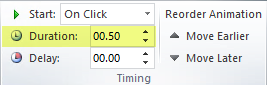 (Maximum: 59 seconds. Minimum: .01 seconds. You can type a duration or use the up or down arrows to select a standard incremental value.)